
Finding Online Classes in PeopleSoft/Highpoint CX
Once you've decided which format works best for you, use the Class Search Tool in PeopleSoft/Highpoint CX to locate available CGS online courses.
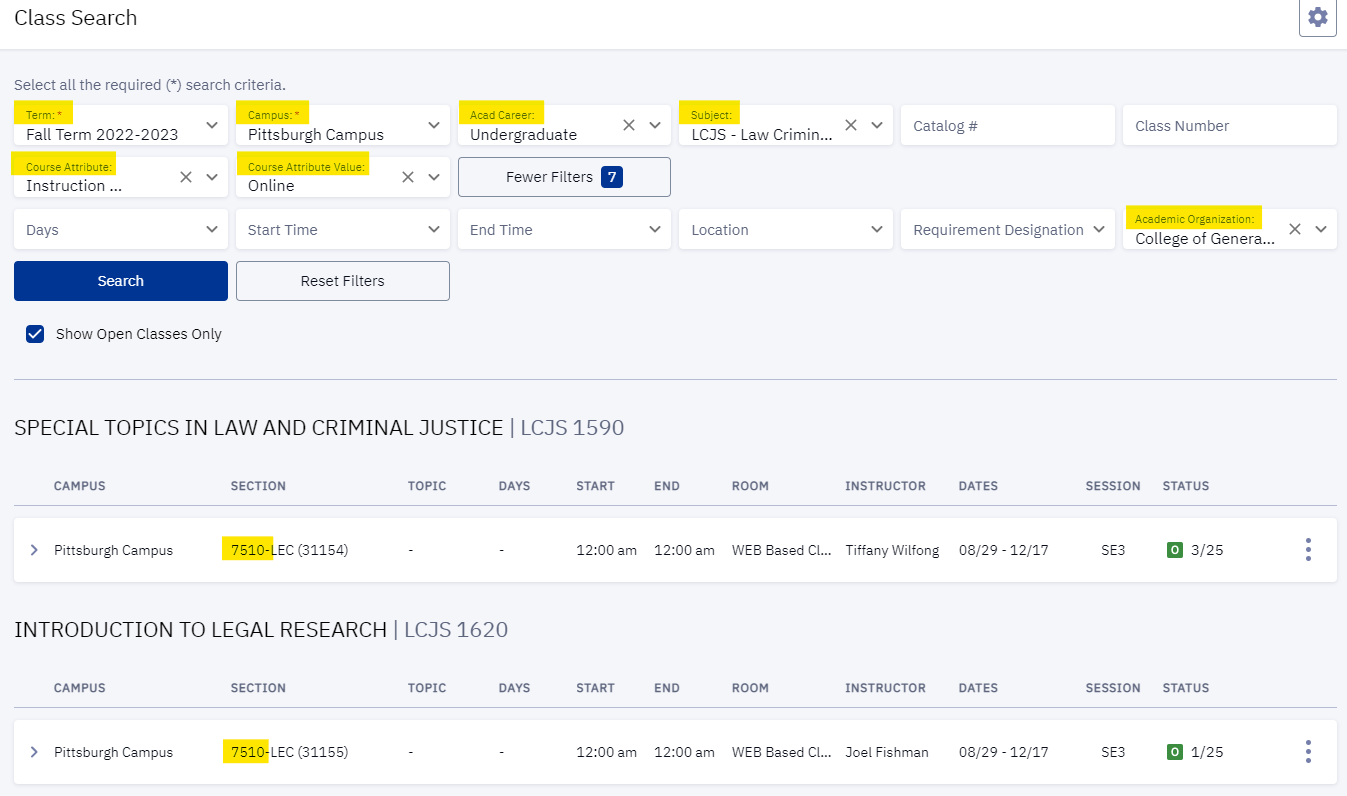
Search in Five Easy Steps
- Select the Term, Pittsburgh Campus, Undergraduate career, and your desired Subject.
- Under Course Attribute, choose Instruction Method/Materials.
- Under Course Attribute Value, select Online or Hybrid.
- Under Academic Organization, choose College of General Studies.
- Review the available course offerings.
(Click the screenshot below to enlarge.)
Ready to Register?
Current Students
Register for CGS Online courses through myPitt, just as you would for any other course.
If you are enrolled in another Pitt school or campus, consult your academic advisor before registering to ensure the course applies to your degree program.
Need help? Visit the Course Registration page for additional information.
New Students
Interested in taking CGS Online courses?
Learn more about the admissions process and submit your application to begin your CGS journey.